# Wiki: Orniton
Orniton is a cryptocurrency wallet designed specifically for NFT enthusiasts to empower the growing NFT ecosystem and everyday users with functionality they never have!
Here you can find all information about it:
### [Terms of use / Правила использования](/terms-of-use-pravila-ispolzovaniya)
### [Privacy Policy / Политика конфиденциальности](/privacy-policy-politika-konfidencialnosti)
### [Subscription prices](/subscription-prices) [Подписка и цены на комисии](/podpiska-i-ceny-na-komisii)
### [Guide \[EN\]](/guide-en/intro)
### [GUIDE \[RU\]](/guide-ru/intro)
# Privacy Policy / Политика конфиденциальности
**Privacy Policy for Orniton Wallet**
*Last Updated: 01.10.2024*
At Orniton Wallet, your privacy is of paramount importance to us. This Privacy Policy explains how Orniton Wallet ("we", "us", "our") collects, uses, and protects the information you provide when using our services, including our website, applications, and any associated services (collectively, "Orniton Wallet" or "Services"). By using our Services, you agree to the terms of this Privacy Policy.
***
#### 1. **Information We Collect**
Orniton Wallet is committed to collecting as little personal information as possible. We collect and process the following types of information:
**a. Personal Information You Provide**
* **Account Information**: When you create an Orniton Wallet account or use certain features, you may be asked to provide information such as your email address or other identifiers necessary for account creation.
* **Customer Support**: If you contact us for support or other inquiries, we may collect information such as your name, email address, and the contents of your communication.
**b. Automatically Collected Information**
* **Usage Data**: We may collect information about how you interact with our Services, including your device’s IP address, browser type, and operating system, as well as the dates and times of your interactions with the Services.
* **Cookies and Tracking Technologies**: Orniton Wallet may use cookies or similar technologies to enhance your experience, such as remembering your preferences and understanding how you interact with our platform.
**c. Blockchain Data**
Due to the nature of blockchain technology, any transaction made using Orniton Wallet is recorded on public blockchain networks. This data is publicly accessible and may include details such as wallet addresses and transaction amounts. Orniton Wallet does not control or manage blockchain data and cannot erase or modify this information.
***
#### 2. **How We Use Your Information**
Orniton Wallet uses the information we collect for the following purposes:
* **Account Creation and Management**: To create and manage your account with us, including sending verification emails and providing access to the wallet features.
* **Service Improvements**: To improve and optimize the functionality of Orniton Wallet, based on user feedback and usage patterns.
* **Customer Support**: To assist you when you contact us for help or submit inquiries.
* **Security and Compliance**: To protect the integrity and security of our Services and comply with legal obligations.
***
#### 3. **Sharing Your Information**
Orniton Wallet does not sell, rent, or trade your personal information. We will only share your data in the following situations:
* **Service Providers**: We may share your information with trusted third-party service providers who assist us in delivering the Services. These parties are required to maintain the confidentiality of your information.
* **Legal Compliance**: We may disclose your information if required to do so by law or in response to valid legal requests, such as subpoenas or court orders.
* **Business Transfers**: In the event of a merger, acquisition, or sale of assets, we may transfer your information to the relevant third party involved in the transaction, subject to the same level of privacy protection.
***
#### 4. **Your Control Over Your Information**
You have the following rights and controls over your personal data:
* **Access**: You may request access to the personal information we hold about you.
* **Correction**: If any information is inaccurate or incomplete, you have the right to request its correction.
* **Deletion**: You may request that we delete your personal data, although this may not extend to data stored on blockchain networks, as Orniton Wallet does not control blockchain technology.
* **Opt-Out**: You can opt out of receiving marketing communications by following the unsubscribe instructions provided in any emails we send.
To exercise these rights, please contact us at \[support email].
***
#### 5. **Data Security**
We are committed to protecting your personal information. Orniton Wallet uses a variety of security measures to help safeguard your data, including encryption, access control, and secure servers.
However, no system is completely secure. Therefore, while we strive to protect your information, we cannot guarantee its absolute security. Users are also responsible for the security of their devices, private keys, and any data related to their use of Orniton Wallet.
***
#### 6. **Half-Custodial Nature and User Responsibilities**
As Orniton Wallet operates as a **half-custodial wallet**, you are responsible for managing your share of the wallet’s private key (e.g., backup phrases). Orniton may hold an encrypted version or a part of the private key for recovery purposes, but **we do not have full access to your wallet or assets** without your participation.
You are responsible for safeguarding your private key and backup phrases. **Orniton will never request your private key** through any form of communication. Please be aware of phishing attacks and other security risks.
***
#### 7. **Children's Privacy**
Orniton Wallet is not intended for use by individuals under the age of 18. We do not knowingly collect personal information from children. If we become aware that we have inadvertently collected information from a child, we will take steps to delete it as soon as possible.
***
#### 8. **Data Retention**
We retain personal data for as long as necessary to fulfill the purposes described in this Privacy Policy, or as required by law. Blockchain transaction data cannot be erased, as it is publicly recorded and decentralized.
***
#### 9. **International Data Transfers**
Orniton Wallet may process or store your data outside of your home country, including in jurisdictions that may not provide the same level of data protection as your local laws. We take steps to ensure that any data transfers comply with applicable laws.
***
#### 10. **Changes to the Privacy Policy**
We may update this Privacy Policy from time to time to reflect changes in our practices or legal obligations. Any updates will be posted on our website, and we encourage you to review this Policy regularly to stay informed.
***
#### 11. **Contact Us**
If you have any questions or concerns regarding this Privacy Policy, or if you wish to exercise your rights, please contact us at:
* **Email**: \[support email]
***
By using Orniton Wallet, you acknowledge that you have read, understood, and agree to this Privacy Policy.
# Terms of use / Правила использования
Terms of Use for Orniton Wallet\
\
Welcome to Orniton Wallet! These Terms of Use ("Terms") govern your access to and use of the Orniton Wallet services, including any applications, websites, and other associated services (collectively, "Orniton Wallet" or "Services"). By accessing or using the Orniton Wallet, you agree to comply with these Terms. Please read them carefully.
Last Updated: 02.10.2024
***
#### 1. Acceptance of Terms
By accessing or using Orniton Wallet, you agree to be bound by these Terms and all applicable laws and regulations. If you do not agree with these Terms, you are prohibited from using our Services.
#### 2. Eligibility
To use Orniton Wallet, you must be at least 18 years old and legally capable of entering into contracts under the applicable law. You must not be barred from using such services under any applicable jurisdiction.
#### 3. Wallet Creation and Security
Orniton Wallet operates as a half-custodial wallet, where both you and Orniton share responsibility for securing your private keys. The system may involve mechanisms such as encrypted key storage, multi-signature (multi-sig) authorization, or recovery features that allow Orniton to assist in key recovery under certain circumstances.
* Account Responsibility: You are responsible for managing your share of the security keys (e.g., a backup phrase or partial private key). Orniton may hold another part of the key or may have the ability to authorize transactions in cooperation with you, depending on the security structure implemented.
* Shared Control: Orniton may help facilitate the recovery of lost keys under certain conditions (e.g., if you lose access to your share of the security key), but cannot guarantee recovery in all cases. You are required to follow security protocols to minimize the risk of losing access.
* Limited Access: Orniton cannot access your funds without your authorization unless explicitly agreed upon during specific scenarios, such as key recovery.
#### 4. Supported Cryptocurrencies
Orniton Wallet supports various cryptocurrencies, but we do not guarantee that any specific asset will be supported indefinitely. We may add or remove support for cryptocurrencies at our sole discretion.
* Third-Party Blockchain Networks: Orniton Wallet interacts with third-party blockchain networks. We have no control over these networks and are not responsible for their operations, security, or availability.
#### 5. Transactions
All transactions initiated through Orniton Wallet are irrevocable once broadcasted to the blockchain. Orniton Wallet does not have the ability to reverse, cancel, or modify any transactions.
* Partial Custodianship: Although Orniton may have the ability to co-sign or facilitate transactions depending on the wallet structure, all transactions still require user authorization. Orniton’s role in managing transactions may be limited to providing extra security (e.g., multi-signature authorization) or managing a backup key that is only used for account recovery.
* Transaction Fees: You acknowledge that transactions made through Orniton Wallet are subject to network fees and other costs associated with processing cryptocurrency transfers.
* Verification: It is your responsibility to verify all transaction details, including recipient address, amount, and fee settings.
#### 6. Risks
You acknowledge and accept the following risks associated with using Orniton Wallet:
* Volatility: The value of cryptocurrencies can be highly volatile and may fluctuate significantly over short periods.
* Technical Risk: The underlying blockchain networks may experience downtime, high transaction fees, or other technical issues beyond our control.
* Security Risks: The half-custodial nature of Orniton Wallet presents unique risks. While Orniton provides additional layers of security, users are still responsible for their part of the private key. If either Orniton’s or your security is compromised, your funds could be at risk.
#### 7. Prohibited Activities
You agree not to engage in any of the following prohibited activities:
* Illegal Activities: Using Orniton Wallet for any unlawful purposes, including money laundering, financing terrorism, or other criminal activities.
* Unauthorized Access: Attempting to gain unauthorized access to our systems or third-party networks integrated with Orniton Wallet.
* Interference: Engaging in activities that may interfere with or disrupt the proper functioning of the Services.
#### 8. Intellectual Property
All content, trademarks, and other intellectual property within Orniton Wallet remain the property of Orniton or its licensors. You are granted a limited, non-exclusive, non-transferable license to use the Services in accordance with these Terms.
#### 9. Disclaimer of Warranties
Orniton Wallet is provided "as is" without any warranties of any kind, whether express or implied, including but not limited to implied warranties of merchantability, fitness for a particular purpose, and non-infringement.
We do not guarantee that the Services will be uninterrupted, error-free, or secure. You acknowledge that your use of Orniton Wallet is at your own risk.
#### 10. Limitation of Liability
To the maximum extent permitted by law, Orniton and its affiliates, officers, directors, employees, and agents shall not be liable for any direct, indirect, incidental, special, or consequential damages arising out of or related to your use of Orniton Wallet, even if advised of the possibility of such damages.
This includes, without limitation, damages related to the loss of funds, data, or use of the Services.
#### 11. Indemnification
You agree to indemnify, defend, and hold Orniton and its affiliates harmless from any claims, damages, liabilities, and expenses (including legal fees) arising out of your use of the Services or your violation of these Terms.
#### 12. Changes to the Terms
We may update these Terms from time to time at our sole discretion. Any changes will be effective immediately upon posting the revised version on our website or through our application. You are responsible for reviewing the Terms regularly to stay informed of any changes.
#### 13. Termination
We reserve the right to terminate or suspend your access to Orniton Wallet at any time, with or without notice, for any reason, including violation of these Terms or any applicable law.
#### 14. Governing Law
These Terms and any disputes arising from them will be governed by and construed in accordance with the laws of \[Jurisdiction], without regard to its conflict of laws principles.
#### 15. Contact Us
If you have any questions or concerns about these Terms or Orniton Wallet, please contact us at @unlima\_contact.
# Subscription prices
Subscription is not mandatory for purchase. All our services are available without a subscription! Subscription only improves your experience using Ornithon.
Subscription offers you the following features:
* Auto repeat order for NFT purchase. You will not have to place an order again every time if the attempt is unsuccessful.
* Minimum commission for purchase.
* Restart order after successful purchase.
* Up to 5 wallets with active orders.
* Purchase in several threads. This is how scripters work, increasing the chance of purchase.
* No commission for mass mailing
* Minimum commission for exchange
* Collection attributes
* Buy buttons in NFT notifications
* Ability to buy on several markets at once
* Automatic listing for sale after purchase and reduced commission. The list is constantly updated.
**Subscription costs 7 TON per 3 month, 3 TON per month and 1 TON per 1 week** \
\
Purchase is made by sending a transaction in our interface to the sniper wallet. Pro subscription can't guarantee 100% auto-purchase!\
\
Multi-send service fee table:
| **Without PRO** | **With PRO** |
| --------------- | ------------ |
| 0.15 | 0 |
NFT Auto-purchase seevice fee table:
Price NFT (TON)
Without PRO
With PRO
0 - 5
0.3
0.1
5 - 20
0.5
0.2
20 - 50
1
0.5
более 50
2
1
# Подписка и цены на комисии
Подписка не требуется для авто-покупки. Все наши сервисы доступны без подписки! \
\
Подписка только улучшает ваш опыт использования Orniton. Подписка предлагает вам следующие возможности:
* Автоматический повторный заказ на покупку NFT. Вам не придется каждый раз оформлять заказ заново, если попытка оказалась неудачной.
* Минимальная комиссия за покупку.
* Повторный заказ после успешной покупки.
* До 5 кошельков с активными заказами.
* Покупка в несколько потоков. Так работают скриптеры, увеличивая вероятность покупки.
* Отсутствие комиссии за массовую рассылку.
* Минимальная комиссия за обмен.
* Атрибуты коллекции.
* Кнопки покупки в уведомлениях NFT
* Возможность покупки на нескольких маркетах одновременно.
* Автоматическое выставление на продажу после покупки и сниженная комиссия. \
\
\*Список постоянно обновляется.
Стоимость подписки составляет 7 TON на 3 месяца, 3 TON в месяц и 1 TON в неделю
Покупка осуществляется путем отправки транзакции в нашем интерфейсе на кошелек снайпера. Подписка Pro не может гарантировать 100% автопокупку!
Таблица тарифов на услугу многократной отправки:
| **Без PRO** | **PRO** |
| ----------- | ------- |
| 0.15 | 0 |
Таблица комиссий за услугу автоматической покупки NFT:
Цены NFT (TON)
Без PRO
PRO
0 - 5
0.3
0.1
5 - 20
0.5
0.2
20 - 50
1
0.5
более 50
2
1
# Intro
## Guide: Orniton wallet
Welcome to the frequently asked questions about Orniton wallet. \
We tried to describe you a complete guide on how to work with the application. \
If you do not find the answer to your question, you can always ask it \
\
**If you're looking for subscription or fees information, please** [**click here**](/subscription-prices)\
\
**Terms and conditions, or other information about Orniton -** [**click here**](/)
# Wallet creation
**After launching the application, you have the opportunity to create two types of wallets to choose from: Walletv5r1 Higload wallet v2 or v3.**
Wallet creation screen
You can also add your wallet created earlier using other services. In order to add a wallet, you need to enter your secret phrase and select the desired wallet type. After that, the system will show you the existing address of your wallet that was found.
When creating a wallet through our service, you will need to write down the secret phrase at the wallet creation stage. Please note that the secret phrase is not stored on your device and will not be available to you after creating a wallet. It is shown once without the possibility of recovery. After creating a wallet, the secret phrase is encrypted with a master key and stored in encrypted form in the key storage. Access to this storage is possible only if you have a master key, the phrase itself is not decrypted, only its private key is used to carry out automatic operations.\
\
Also, you can create a PIN for your wallet. PIN helps you to double control your withdrawals and operations with your wallet.
**!Important! In the Android/IOS mobile app, your secret phrase is stored on your device and can be decrypted using your signature. In this case, automatic operations are only available via the web or TMA app.**
# Top Up
To top up your wallet, you need to copy your wallet address or use the QR code. Then send the required amount of TON or any other Jettons in the TON network to the received address.
Wallet top-up
\
The top-up occurs instantly, but the transfer time depends on the load on the TON network. At the moment, top-up is only possible using a third-party wallet or exchange. In the future, the wallet will be able to purchase cryptocurrency through third-party services, both fiat and various other cryptocurrencies not in the TON network.
# Making transfers and mass sending
When you go to the sending section, you have the option of standard transfer of TON, Jetton and NFT. To make a withdrawal, fill out the withdrawal form by filling in the required fields: Withdrawal address, withdrawal amount and a comment if desired.
**!ATTENTION! Consider the amount of gas calculated before sending. If there is not enough gas on the balance to pay the network commission, the withdrawal will not be available**
Multi sending is the ability to send several NFTs or various jettons to one or more addresses in one transaction. This is convenient when withdrawing purchased NFTs and also for sending airdrops. In one transaction, it will be possible to specify up to 250 recipients. The commission will be debited for each such transaction + the service commission (with a PRO subscription, there is no commission)
Sending TON from Orniton
# Swap
To exchange tokens via Orniton, you need to go to the "Swap" section
Find and select the token you want to exchange. You can browse the list of tokens or search for a token by name or contract address. When you select a token, the system will automatically detect the desired exchange, but you can also change this manually by clicking on the "DEX" button
You can select tokens in both fields and also swap them. Enter the amount you would like to exchange, receive, or select the "Max" option. The "Max" option will enter the maximum number of tokens you hold in your wallet.
To exchange, click "Swap"
When the exchange is successfully completed, the screen will display the message "Exchange completed!"
# Limit swap
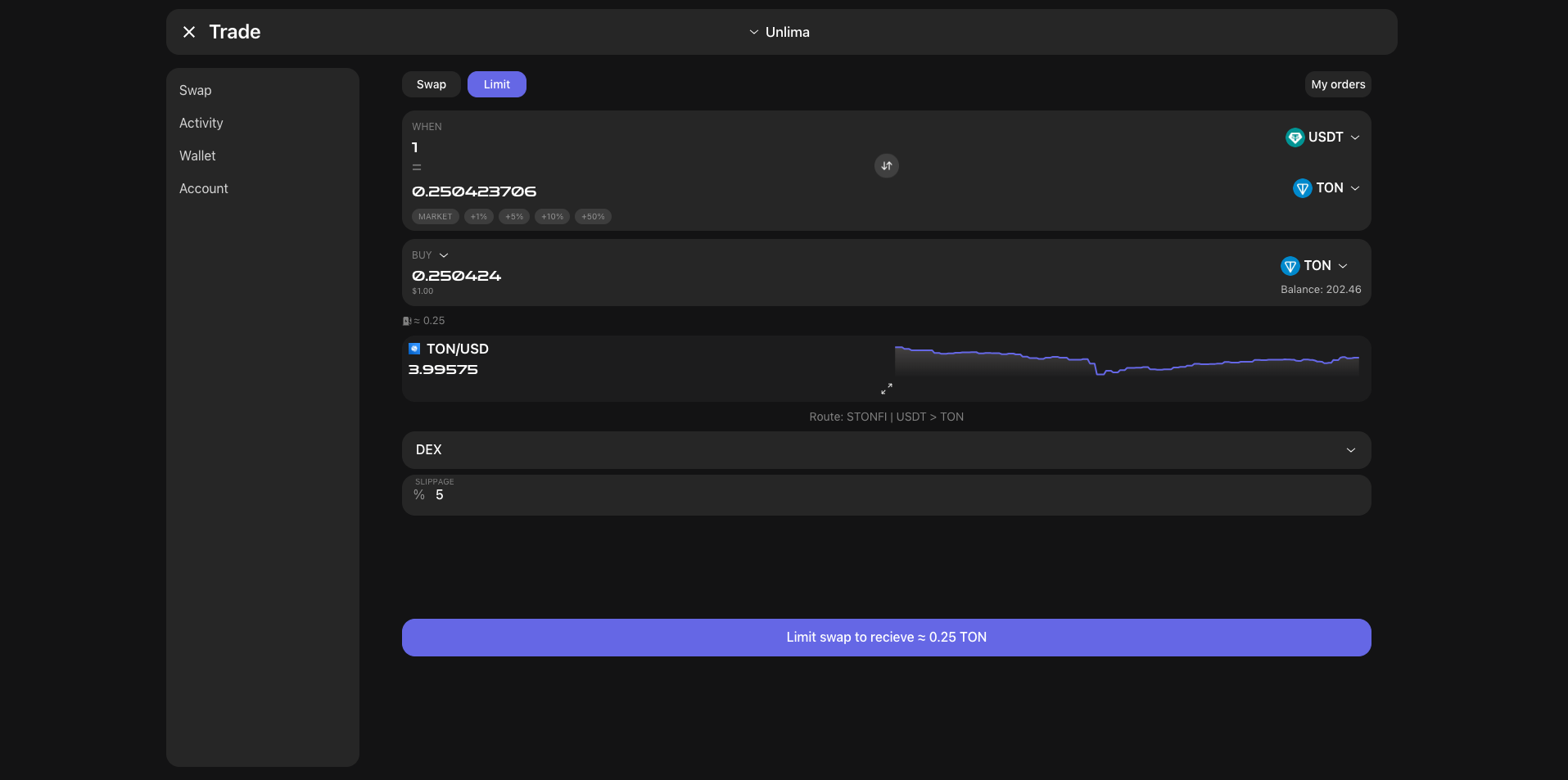
To create a limit order, go to the "Limit" section on the Swap page.
**What is a limit order?** A limit order allows you to buy or sell tokens at a pre-set price. It remains active until it is executed, unless: you cancel it manually, you do not have enough funds on your balance.
How do I create a limit order? After selecting the "Limit" section, the exchange form will open.
1. In the first fields, you must specify the exchange pair and rate.
Next, you must select a trigger.
The trigger token is the asset on the basis of which the order will be triggered.
In the second field, you must select what the trigger should be equal to. Specify at what rate the order should be triggered.
For example: 1 USDT = 0.2504 TON (on the screenshot)
In the third field, you indicate the action you want to perform (buy/sell) one of the tokens in the pair and the amount you want to buy or sell. For example: When 1 USDT = 0.2504 TON, buy 0.250424 TON (on screenshot)
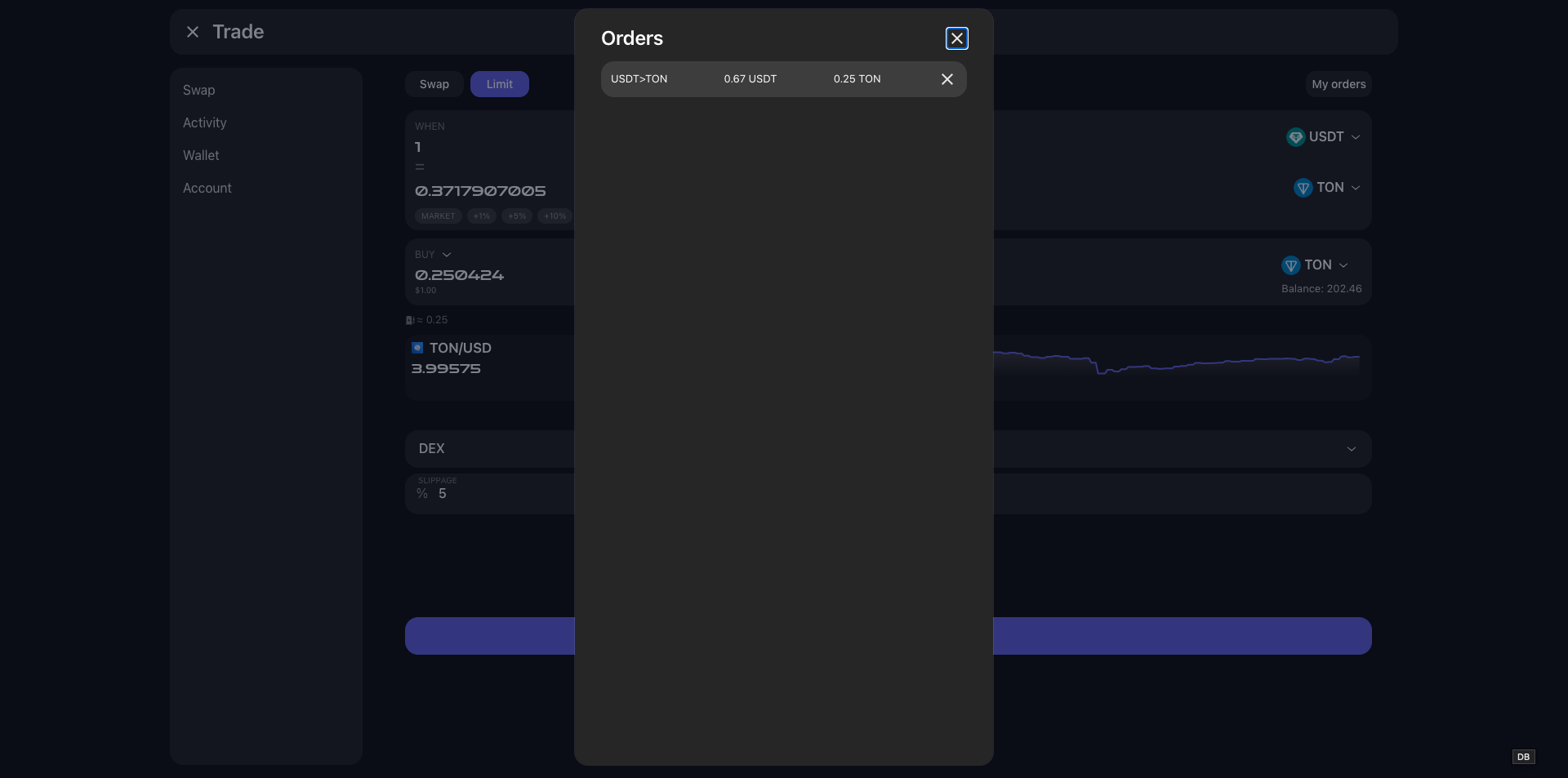
After entering all the data, click "Limit Swap" and your order will appear in the list of active ones.
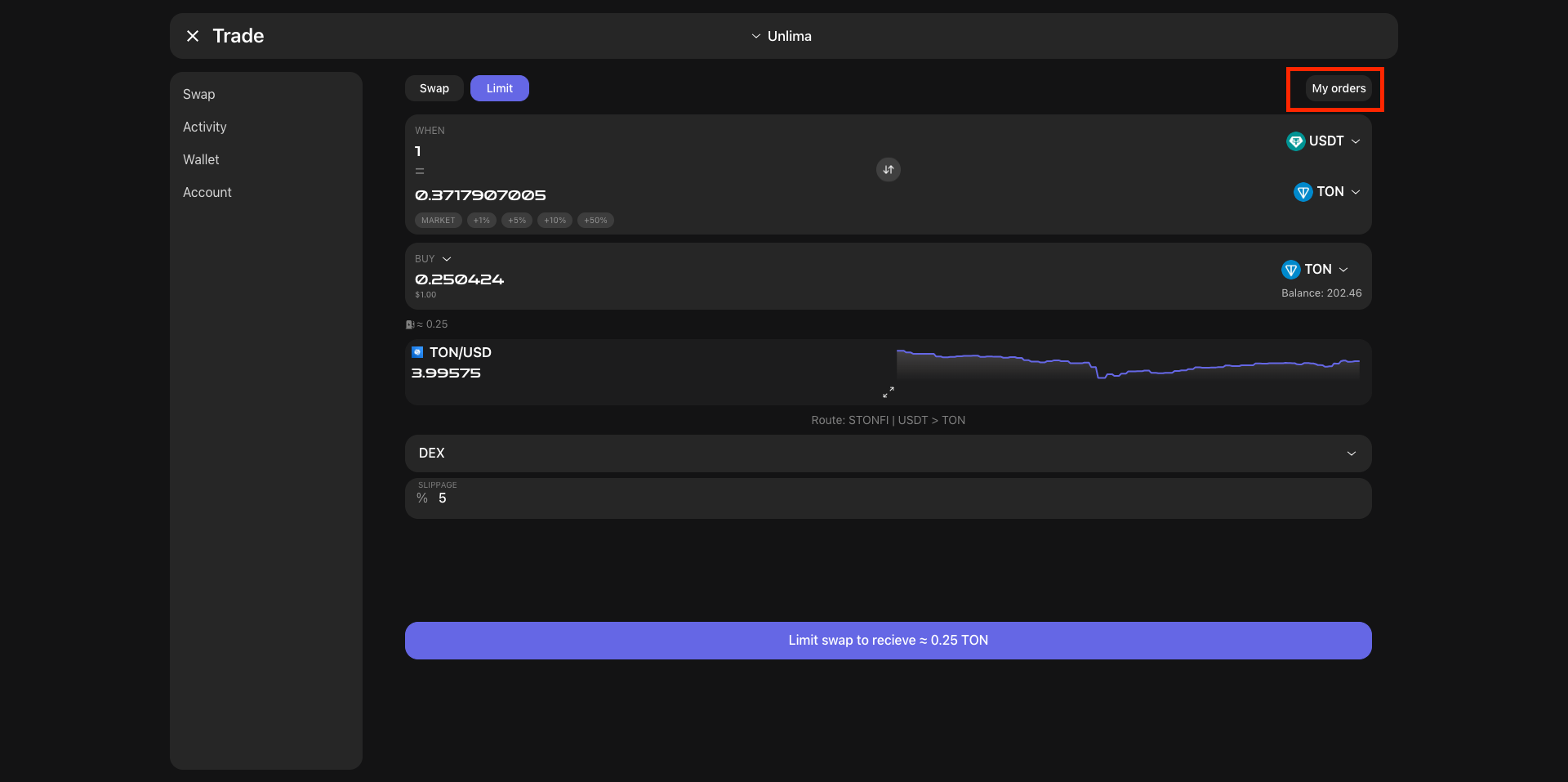
To cancel, you can click on the "cross" icon and the order will be canceled instantly. View active orders - go to the "My Orders" section to monitor the status of your orders.
When the limit order trigger is triggered, if there is an available amount, the order will be executed.
# NFT Auto-buy
NFT Auto-Purchase - allows you to automatically set an order to buy any NFT you are interested in available on Getgems, Xrare and Fragment. When you go to the auto-purchase section, you will be given a list of the most popular collections for 24 hours (in the future, all collections will be available). When you select a specific collection, you can view the current price chart, as well as see the minimum, average and maximum prices at which sales have occurred recently. In the collection section, two functions are available to you:
Notifications - using notifications, you can track profitable offers on the market and quickly buy them using third-party wallets, for example, tonkeeper, tonhub, etc. Notifications will come to Telegram with buttons that will open the application for purchase. The functionality is constantly updated, so the list of wallets and buttons can be changed!
To set a notification, you need to select the range and market you are interested in. The bot will notify you that notifications have been set up and as soon as a lot that matches the parameters becomes available, you will receive a message via the bot.
**Auto purchase** - using auto purchase, you can set an order (similar to orders for buying tokens on exchanges) to buy NFT. When the lot you need is found, the bot will automatically make an attempt to buy. It is important to keep in mind that there is a lot of competition on the market and popular collections can be difficult to buy. If the purchase is not successful, you will receive the entire amount back minus the network commission for gas. If you have a PRO subscription and a sufficient balance on your wallet, the purchase will resume automatically. **At the moment, 1 wallet = 1 active purchase request.**
Please do not set the purchase price lower than possible on the market, there is a chance that the purchase will not be completed. \
\
\
Creating an order for auto-purchase of NFT To set up auto-purchase, you first need to select a collection. Then open the auto-purchase section.
!To successfully create an order, you must have the required amount of TON on the balance of the selected wallet!
The following settings are present on the order creation page:
* Order type: Limit, price range.
* Marketplace: Marketplace on which the NFT will be bought out.
* Price: the price at which you want to buy the NFT.
* Attributes: if the collection has attributes, you can set an order to buy only those that interest you.
Additional functionality, available by subscription.
* Auto-attempt selector: the purchase will be automatically restarted in case of an unsuccessful attempt until it is successful.
* Repeat order selector: the same order will be automatically placed in case of a successful purchase. Convenient when you want to buy several pieces without recreating the order.
* Number of transaction splits: Limited to 5, more details can be found in our blog.
* Auto sell after successful purchase: Specify the price at which you want to put up for sale. After a successful purchase, we will automatically put your NFT on the market.
After confirming the application, you will be shown a screen with the amount that must be on the account. The application is activated immediately after checking the required amount on the balance. Do not rush! Confirmation can take from 1 to 3 minutes! After confirmation, you will receive a notification that the order is active.
When attempting to purchase, you will receive a notification that an attempt to purchase has been made.
If you have a sufficient balance and a PRO subscription, the order will automatically activate and be executed again.
If the purchase is successful, you will receive a notification that the NFT has been purchased and the order will automatically go into pending status.
The rest of the sections are under development! If you have any problems, please write to @unlima\_contact
**Thank you for your support, let's build a reliable and secure service on TON together, and in the future, SOL, ETH!**
# NFT Sale
In orniton, you can sell your NFT on any market, without having to connect your wallet and sign the transaction.
In one click, you can put your NFT up for sale in Getgems, Xrare, etc.
In order to put up your NFT, you need to click the "Sell" button on the page of your chosen NFT.
After that, a form will open in which you need to enter the price, choose whether to pay royalties or not and click continue.
In the confirmation window, carefully check all the information and click put up your NFT for sale. Your NFT will be put up for sale within 1 minute.
# Интро
Добро пожаловать в раздел часто задаваемых вопросов о кошельке Orniton. \
\
Мы постарались описать вам полное руководство по работе с приложением. Если вы не нашли ответ на свой вопрос, вы всегда можете задать его
Если вы ищете информацию о подписке или сборах, [нажмите здесь](/subscription-prices)
Условия и положения или другая информация об Orniton - [нажмите здесь](/)
# Создание кошелька/ добавление кошелька.
**После запуска приложения, у вас есть возможность создать на выбор два вида кошелька: Walletv5r1 , Higload wallet v2 и v3.**
Так-же вы можете добавить свой кошелек созданный ранее с помощью других сервисов. Для того чтобы добавить кошелек необходимо вписать свою секретную фразу и выбрать нужный тип кошелька. После этого система покажет вам найденный существующий адрес вашего кошелька.
При создании кошелька через наш сервис, вам необходимо будет записать секретную фразу на этапе создания кошелька. Обратите внимание что секретная фраза не хранится на вашем устройстве и будет недоступна вам после создания кошелька. \
\
Она показывается единожды без возможности восстановления. После создания кошелька секретная фраза шифруется мастер ключом и хранится в зашифрованном виде в хранилище ключей. Доступ к данному хранилищу возможен только при наличии мастер ключа, сама фраза не расшифровывается, лишь используется ее приватный ключ для проведения автоматических операций.
**!Важно! В мобильном Android/IOS приложении ваша секретная фраза хранится на вашем устройстве и доступна к расшифровке с помощью вашей подписи. В данном случае автоматические операции доступны только через веб или TMA приложение.**
# Внесение средств
Для пополнения кошелька вам необходимо скопировать адрес вашего кошелька или воспользоваться qr кодом. Далле отправить на полученный адрес нужное кол-во TON или любые другие Jetton в сети TON. \
\
Пополнение происходит моментально, но время перевода завсити от нагруженности сети TON. В данный момент пополнение возможно только используя сторонный кошелек или биржу. В будущем внутри кошелька будет доступна возможность покупки криптовалюты через сторонние сервисы как фиат, так и разлчиные другие криптовалюты не в сети TON.
# Совершение переводов и массовая рассылка.
При переходе в раздел отправки вам доступна возможность стандартного перевода TON, Jetton и NFT. Для совершения вывода, заполните форму вывода заполнив необходимые поля: Адрес вывода, сумму вывода и комментарий при желании.
**!ВНИМАНИЕ! Учитывайте размер газа рассчитаный перед отправкой. Если на балансе не хватит газа на оплату комиссии сети, вывод будет не доступен**
Мульти рассылка - это возможность одной транзакцией отправить сразу несколько NFT или различные jetton на один или несколько адресов. Это удобно при выводе купленных NFT а так-же для рассылок аирдропов. В одной транзакции будет возможность указать до 250 адресатов. Комиссия будет списана за каждую такую транзакцию + комиссия сервиса (при наличии подписки PRO комиссия отсутствует)
# Swap торговля
Для обмена токенов через Orniton, необходимо зайти в раздел "Swap"
Найдите и выберите токен, который вы хотите обменять. Вы можете просмотреть список токенов или найти токен по имени или адресу контракта. При выборе токена, система автоматический определит нужную биржу, но вы так-же моежете сменить это в ручную, нажав на кнопку "DEX"
Вы можете выбирать токены в обоих полях и так-же менять их местами.
Введите сумму, которую вы хотели бы обменять, получить или выберите опцию «Макс».
Опция «Макс» введет максимальное количество токенов, которые вы держите в своем кошельке.
Для обмена, нажмите "Swap"
Когда обмен будет успешно выполнен, на экране появится надпись «Обмен выполнен!» .
# Лимитная торговля
Чтобы создать лимитный ордер, перейдите в раздел **"Limit"** на странице **Swap**.
#### Что такое лимитный ордер?
Лимитный ордер позволяет вам купить или продать токены по заранее установленной цене. Он остается активным до момента исполнения, если только:
* вы не отмените его вручную,
* на вашем балансе недостаточно средств.
#### Как создать лимитный ордер?
После выбора раздела **"Limit"** перед вами откроется форма обмена.
\
1\. В первых полях необходимо указать пару на обмен и курс.
Далее необходимо выбрать триггер.
**Триггерный токен** – актив, на основе которого будет срабатывать ордер.
2. В втором поле необходимо выбрать то чему должен равнятся триггер. Укажите, при каком курсе должен сработать ордер.
**Например**: *1 USDT = 0.2504 TON (на сркиншоте)*
3. В третьем поле вы указываете действие которое хотите совершить (купить/продать) один из токенов в паре и сумму которую вы хотите купить или продать.
**Например**: Когда *1 USDT = 0.2504 TON , купи 0.250424 TON (на сркиншоте)*
После ввода всех данных нажмите **"Limit Swap"**, и ваш ордер появится в списке активных.
Для отмены вы можете нажать на иконку "крестик" и ордер моментально отменится.
**Просмотр активных ордеров** – перейдите в раздел **"My Orders"**, чтобы следить за статусом ваших заявок.
Когда триггер на лимитный ордер сработате, при наличии доступной суммы ордер будет выполнен.
# Автопокупка NFT
Автопокупка NFT - позволяет автоматический устанавливать ордер на покупку любой интересующей вас NFT доступной на Getgems, Xrare и Fragment. При переходе в раздел автопокупки вам дсотупен список самых популярных коллекци за 24 часа (в будущем будут доступны все коллекции). При выборе определенной коллекции вы можете ознакомится с текущим графиком цен, а также посмотреть минимальную, среднюю и максимальную цену по которой происходили продажи за последнее время. В разделе коллекции вам доступны две функции:
Уведомления - с помощью уведомлений вы можете отслеживать выгодные предложения на рынке и оперативно их выкупать с помощью сторонних кошельков к пример tonkeeper, tonhub и др. Уведомления будут приходить в телеграм с кнопками которые будут открывать приложение для покупки. Функционал постоянно обновляется, поэтому список кошельков и кнопки могут быть изменены!
Для устанвоки уведомления вам необходимо выбрать интересующий вас диапазон и маркет. В бота вам придет уведомление о том что уведомления натсроены и как только подходящий под параметры лот станет доступен, вы получите сообщение через бота.
**Авто покупка** - с помощью автопокупки вы можете установить ордер (аналогично ордерам на покупку токенов на биржах) на покупку NFT. При нахождении необходимого вам лота, бот автоматический совершит попытку купить. Важно учитывать что на рынке большая конкуренция и популярные коллекции могут быть тяжелы к покупке. Если покупка не будет успешной, вам вернется вся сумма за минусом комисии сети на газ. При наличии PRO подписки и достаточной сумме баланса на кошельке, покупка возобновится автоматический. \
\
**На данный момент 1 кошелек = 1 активная заявка на покупку.**
Пожалуйста не ставьте цену на покупку ниже возможной на рынке, есть вероятность что покупка не совершится. При автопокупки бот автоматический проверяте как и контракт продажи так и саму NFT на ее корректность, тем самым стараясь гарантировать что вы купете оригинальный лот. К сожалению возможны ситуации когда бот может сделать не корреткную покупку, в данной ситуации просьба не паниковать и напсиать незамедлительно в поддержку для решения вопроса о возмещени средств. Мы постоянно совершенствуем сервис и стараемся сделать его безопасным, но мошенники также совергенствуют свои технологии. Учтите что мы не сможем возместить ваши затраты на газ! Так-же мы не можем к сожалению гарантировать 100% покупкпу. Все сбои и отключения сети TON так-же являются форс мажорным обстоятельствами и никак не компенсируются с стороны сервиса. Помните вы отвественны за вс едействия вне нашего приложения!
### **Как создать заявку на автопокупку NFT**
#### **1. Выбор коллекции**
Первым шагом для создания ордера на автопокупку является выбор коллекции, в которой вы хотите приобрести NFT. Найдите интересующую вас коллекцию через встроенный поиск в Orniton, затем перейдите в раздел **"Автопокупка"**.
#### **2. Настройка ордера**
После выбора коллекции перейдите на страницу создания ордера. Здесь вам предстоит настроить параметры автопокупки:
**Основные настройки ордера:**
* **Вид ордера:**
* *Лимитный ордер:* Вы указываете точную цену, по которой хотите приобрести NFT.
* *Ценовой диапазон:* Вы можете задать минимальную и максимальную цену, в рамках которой будет осуществляться покупка.
* **Маркетплейс:** Выберите маркетплейс, на котором вы хотите выкупить NFT (например, Getgems.io или другой поддерживаемый маркетплейс).
* **Цена:** Укажите цену или диапазон цен, по которым вы готовы приобрести NFT. Это важно для того, чтобы система смогла автоматически купить NFT в подходящий момент.
* **Атрибуты:** Если коллекция поддерживает атрибуты, вы можете уточнить покупку, выбрав интересующие вас атрибуты NFT, например, редкость или уникальные характеристики.
#### **3. Дополнительные функции (доступны по подписке):**
Для пользователей с подпиской доступны расширенные возможности:
* **Селектор автопопытки:** Включите автоматический перезапуск ордера в случае неудачной покупки. Это позволяет системе повторять попытки до успешного завершения.
* **Селектор повторного ордера:** Активируйте автоматическое создание нового ордера после успешной покупки. Полезно, если вы хотите приобрести несколько NFT без необходимости вручную пересоздавать заказы.
* **Количество дроблений транзакции:** Вы можете выбрать, на сколько частей будет дробиться транзакция. Это особенно актуально для покупки нескольких NFT одновременно. Подробнее читайте в нашем блоге.
* **Автопродажа после покупки:** Задайте цену, по которой хотите сразу выставить купленный NFT на продажу. Как только покупка будет завершена, система автоматически разместит NFT на маркетплейсе по указанной вами цене.
#### **4. Подтверждение заявки**
После того как все параметры настроены, система покажет вам сумму, которая должна быть на балансе вашего кошелька для активации ордера. Убедитесь, что на вашем счету достаточно средств!
Заявка активируется сразу после того, как система проверит баланс. Процесс может занять от 1 до 3 минут. Когда ордер будет активирован, вы получите уведомление.
При попытки покупки вы получите уведомление о том что была совершена попытка покупки.
При наличии достаточного баланса и подписки PRO ордер самостоятельно активируется и снова исполнится.
При успешной попкупке, вы получите уведомление о том что NFT куплена и ордер автоматический прейдет в статус ожидания.
**Остальные разделы находятся в разработке! При возникновении проблем просьба писать @unlima\_contact**
**Спасибо за вашу поддержку, давайте вместе посторим надежный и безопасный сервис на TON а в бдуущем и SOL, ETH**
# Продажа NFT
В orniton есть возможность продать свою NFT на любом маркете, без необходимости подключения своего кошелька и подписи транзакции.\
\
В один клик, вы можете вытсавить NFT на продажу в Getgems, Xrare и др. \
\
Для того чтобы выставить NFT, необходимо нажать на кнопку "Продать" на странице выбранной вами NFT.\
После этого вам откроется форма в которой необходимо ввести цену, выбрать платить роялти или нет и нажать продолжить.
На окне подтверждения проверьте внимательно всю информацию и нажмите выставить NFT на продажу. Ваша NFT будет выставлена в течении 1-ой минуты.